
I used to think the answer to feeling overwhelmed was more tools. Every time something felt slow, I’d go find an app for it, constantly searching for better automation tools for business. I needed a project management tool for the chaos. I needed a scheduling tool for the emails. A content tool helped with writer’s block. What actually happened is I ended up managing the tools instead of the work. I’d open my laptop. Spending the first twenty minutes updating statuses across three different dashboards is not efficient. Client work remained untouched, even though that was the priority.
Why I Changed My Approach
I remember one particular Tuesday morning clearly, It felt ridiculous in hindsight. I opened my laptop with an actual plan. Forty minutes later, I was still moving cards between columns. I was also renaming a custom field and answering notifications. Not one client had heard from me yet. That was the morning I stopped feeling productive and started feeling like an unpaid data-entry clerk for my own business.
I stopped asking ‘what tool could help?’ I started asking a blunter question. Does this tool actually give me back more time than it takes to run? Most tools fail that test quietly. They look impressive in a demo and then slowly become one more tab you have to babysit.
The 3-Rule Filter for My Tools
It has to be simple. If I need a tutorial longer than the task it’s solving, it’s not saving me time, it’s borrowing time from next week to spend this week.
It has to integrate. A tool that lives on its own little island, disconnected from everything else I use, just becomes another manual step. Copy this here, paste that there. The whole point of automation is that things talk to each other without me being the middleman.
It has to pay for itself. I don’t mean in a vague way. It must save me paid hours. It should catch leads I would have otherwise lost to slowness. If I can’t point to what it’s buying me, it’s just a subscription. I should stop ignoring it.
Everything else gets cut eventually. These three automation tools for business didn’t.
🏆 Automation Tools for Business: The Best Picks
1. Make.com — One of the Top Automation Tools for Business
This is the tool doing the quiet, unglamorous work in the background of basically everything else I run. It’s the connective tissue between all my other tools, so nothing has to be moved by hand.
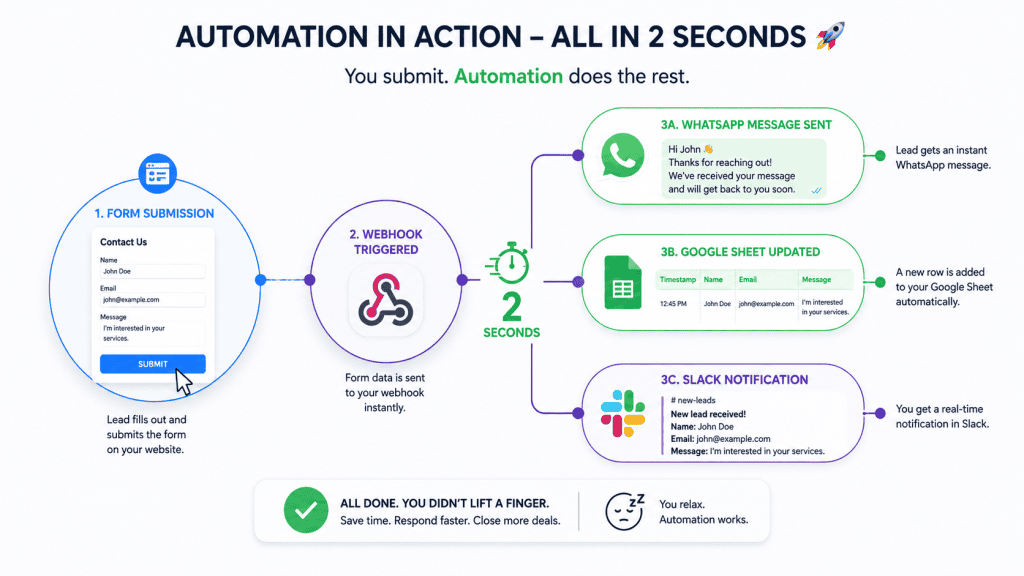
What makes it win over other automation platforms I’ve tried is that visual layout. A lot of tools force you into a rigid, linear “if this, then that” structure. Make.com lets the logic branch, loop, and split in ways that actually match how real workflows behave, which matters a lot once you’re automating something with real decision points in it, like the after-hours lead-capture flow I wrote about a while back. That entire system runs on Make.com in the background, 24 hours a day, and I don’t think about it unless something breaks.
What makes it win over other automation platforms I’ve tried is that visual layout. A lot of tools force you into a rigid, linear “if this, then that” structure. Make.com lets the logic branch, loop, and split in ways that actually match how real workflows behave, which matters a lot once you’re automating something with real decision points in it, like the after-hours lead-capture flow I wrote about a while back. That entire system runs on Make.com in the background, 24 hours a day, and I don’t think about it unless something breaks.
Why Make.com is a Game Changer
I still remember the first time I actually felt this pay off instead of just trusting it in theory. I was at a family function, phone tucked away, definitely not thinking about work, and glanced at it out of habit somewhere between two courses. There was a Slack ping sitting there, calm and unremarkable: new lead in, WhatsApp reply sent, row added to the sheet, all timestamped from twenty minutes earlier while I’d had zero idea it was even happening. That’s when it stopped feeling like a clever setup and started feeling like an actual employee who never takes a day off.
2. Claude — Automation Tools for Business Content & Strategy Copilot
This one replaced what used to be the slowest part of my week: staring at a blank doc trying to turn a client’s scattered notes into an actual first draft.
The mental screenshot here is a split screen. On the left, I drop in raw material, bullet points from an SEO brief, half-formed notes from a client call, a rough outline. On the right, inside the Artifacts window, a properly structured draft builds out in real time, one that actually sounds like a person wrote it instead of a content mill.
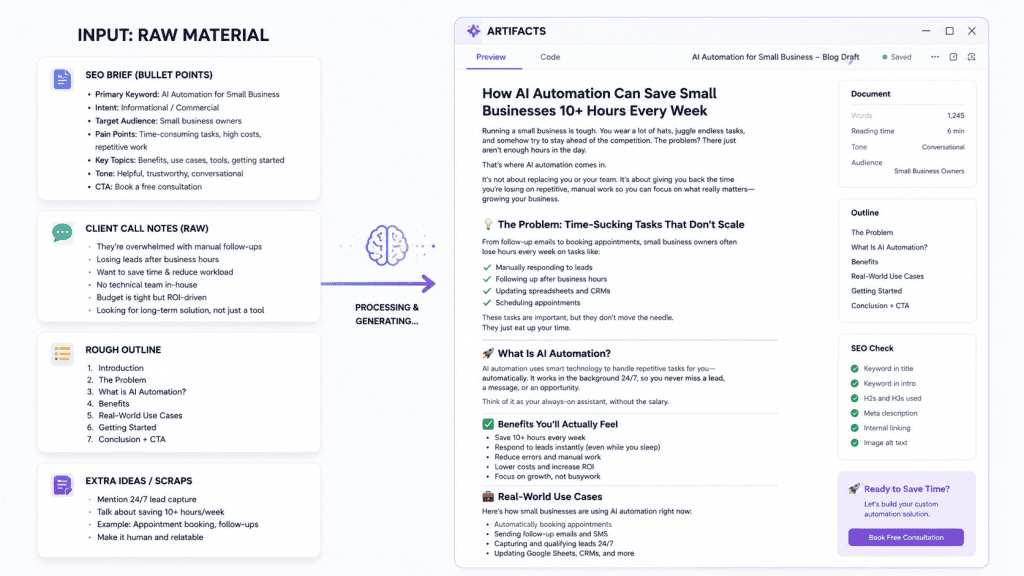
The reason this beats every other AI writing tool I tried isn’t speed, plenty of tools are fast. It’s that the output doesn’t sound like it came out of a template. No “in today’s fast-paced world,” no generic listicle structure slapped onto every topic regardless of whether it fits. It actually holds onto a specific voice once you show it what that voice sounds like, which is the difference between a first draft I can publish with light edits and a first draft I have to basically rewrite from scratch.
The reason this beats every other AI writing tool I tried isn’t speed, plenty of tools are fast. It’s that the output doesn’t sound like it came out of a template. No “in today’s fast-paced world,” no generic listicle structure slapped onto every topic regardless of whether it fits. It actually holds onto a specific voice once you show it what that voice sounds like, which is the difference between a first draft I can publish with light edits and a first draft I have to basically rewrite from scratch.
Getting From Blank Page to Draft in Seconds
There was a night, not long before a client deadline, where I sat staring at a blinking cursor for probably twenty straight minutes, completely blank, the kind of blank where you start reorganizing your desktop icons just to feel like you’re doing something. I dropped in a messy pile of half-formed notes from a call earlier that day, half-sentences, no real structure, and had an actual usable draft back before my tea had even gone cold. I didn’t publish it exactly as is, I never do, but I went from a blank page to something worth editing in the time it used to take me to just work up the nerve to start typing.
3. Calendly — The Friction-Killer
This is the smallest tool on the list and somehow the one that removes the most quiet frustration from my week.
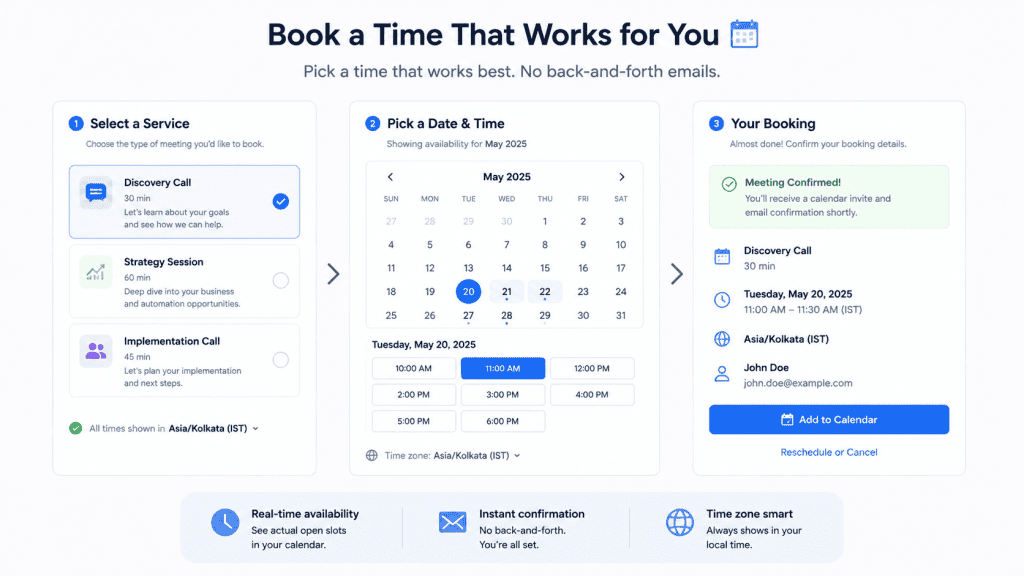
The real value isn’t the time saved on scheduling, though that adds up too. It’s that leads book while their interest is at its peak. The old back-and-forth gives someone three days to lose momentum, get distracted, or just forget why they wanted to talk to you in the first place. Removing that gap is worth more than the minutes it saves.
I lost a lead once, before I’d set any of this up, purely to scheduling fatigue. Three emails in, still hadn’t landed on a time, and by the fourth they’d just gone quiet. Not rude, not a no, just quiet, the kind of quiet that means someone’s interest cooled off somewhere in the back-and-forth. I think about that lead sometimes, not because it was a huge loss, but because it was such an avoidable one. These days that entire exchange is just one link and a click, and I genuinely don’t know how many of those I would’ve lost the same way if I hadn’t fixed it.
❌ The Loser
ClickUp — The Over-Engineered Trap
I wanted to love ClickUp. On paper, it does everything—tasks, goals, whiteboards, and dashboards—all in one place. That sounded like the perfect consolidation. I watched the onboarding videos and felt genuinely excited. Then, I set aside a weekend to configure it properly. It was meant to be the last project management tool I would ever need.
In practice, it became a second job. Instead of doing client work, I spent my time updating statuses. I spent time configuring custom fields. I spent time rearranging views. The tool that was supposed to organize my work became a task in itself. Automation tools for business don’t always fit every workflow. I often spent an hour making my task list look organized without actually finishing a single task. I hit that wall too many times before I accepted that it wasn’t working.
It’s a good example of failing the first rule on my list. It wasn’t simple, and no amount of integrations or dashboards made up for the fact that using it properly took more energy than the thing it was meant to track. I didn’t ditch it because it was bad software. I ditched it because it cost more time than it gave back, and that’s the only test that actually matters.
The Actual Point
None of these three tools are the “best” tool in their category on some review site. They’re just the ones that disappeared into my workflow instead of becoming one more thing to manage. That’s really the whole test worth applying to any automation tools for business you’re considering adding to your stack. Ask yourself: does this do a lot? Or does it quietly give me my hours back? Avoid anything that just sits there asking for attention you don’t have.
I think back to that Tuesday morning often. I lost the first hour of my day to a to-do list about my to-do list. In a strange way, these three tools are the reason that morning doesn’t repeat itself anymore. I didn’t find the perfect system, as I don’t think that exists. Instead, I finally got honest about which tools were working for me and which ones I was just working for.
Ready to implement automation tools for business that actually save you time? Visit my Services page to learn more.